

Webflow pricing at a glance (October 2026)

If you want to know “How much is Webflow per year?” the answer is as follows: $180 per year for the Webflow Basic site plan and $300 per year for the Webflow Premium site plan. Of course, that’s not all: Webflow pricing encompasses other plans and configurations, each of which comes with its own associated costs. You can find these Webflow pricing plans, organized by site plan, in the table below.
- Webflow Starter: Free
- Webflow Basic: $180 Per Year/$15 Per Month
- Webflow Premium: $300 Per Year/$25 Per Month
- Webflow Team: $30,000 Per Year/$2,500 Per Month - No Monthly Billing Option
- Webflow Enterprise: Custom Quote Only
Outside of the Webflow site plans clarified above, Webflow offers “Workspace” plans. Your Webflow Workspace plan controls code export tools, staging permissions, and team collaborations; along with a wide variety of other things. If you run a B2B website, you will, most likely, need a Webflow site plan as well as a Webflow Workspace plan.
What changed in the May 2026 plan update
Before May of 2026, this is what Webflow plans looked like:
- Separate CMS and Business plans, along with distinct CMS and bandwidth caps.
- The Basic plan was priced around $14 a month on the annual plan and $19 a month on the monthly plan.
- The Basic plan came with a limit of 150 static pages.
- For Team and Enterprise plans, mid-market options required piecing together agency/workspace features.
- Many of the Team and Enterprise plans also required scaling directly.
- AI credits were handled and/or billed separately.
After May of 2026, this is what Webflow plans looked like and, as of October of 2026, still look like:
- The CMS and Business plans merged into a single “Premium” plan with a cost of $25 a month on the “Annual” billing schedule and $39 a month on the “Monthly” billing schedule.
- The total CMS items for the Premium plan increased to 20,000 items and the Premium plan can host up to 300 static pages. But, the bandwidth dropped down to 50GB, less than the CMS and Business plans.
- The Basic plan now costs $15 a month on the “Annual” billing schedule and $25 a month on the “Monthly” billing schedule.
- Webflow introduced a new mid-market option called the “Team” plan. The Team plan costs $2,500 a month through an “Annual” pricing schedule.
- Webflow’s Team plan comes with 100 CMS collections, 10 seats, and a multitude of features that were previously locked to the Enterprise Webflow site plan.
- AI credits are now bundled directly into Workspace plans. They are no longer handled and/or billed separately.
You can find Webflow’s May of 2026 update right at this link. Here is Webflow’s help center article, regarding these Webflow pricing changes.
Site plans: Starter, Basic and Premium
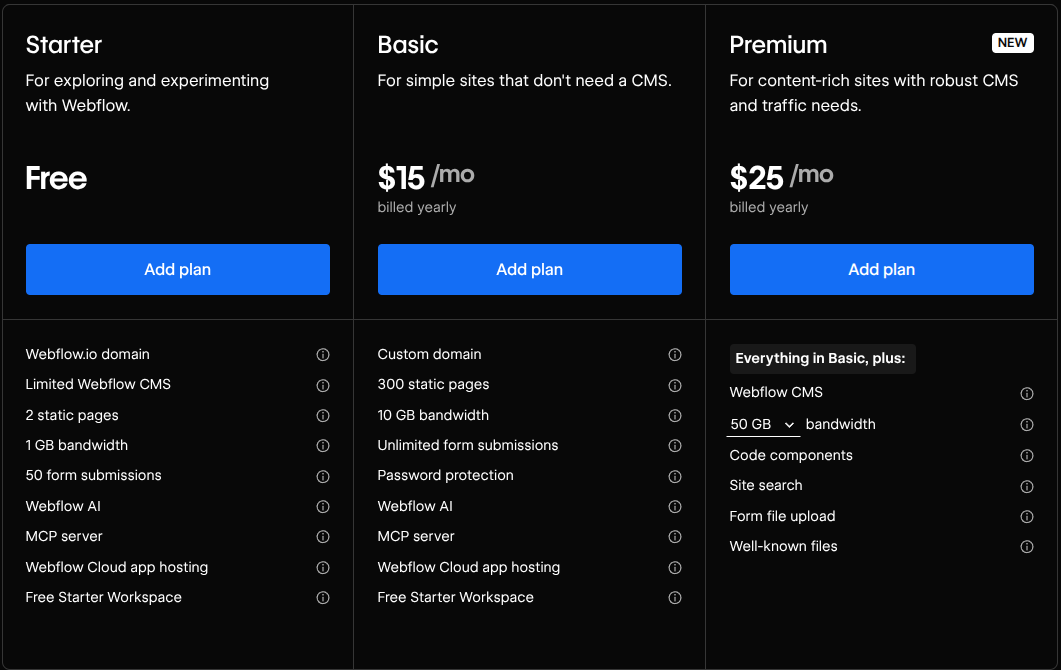
Webflow offers three primary site plans: Starter, Basic, and Premium. These plans affect Webflow pricing and define Webflow hosting pricing, as well as Webflow CMS pricing.
Here is what the Starter Webflow site plan unlocks for a typical B2B marketing site:
- Price: Free.
- Custom domain: No.
- Static page limits: 2 static pages.
- CMS items and collections: A limited CMS, with 50 items and 2 collections.
- Bandwidth: 1GB per month.
- Form submissions: 50 lifetime form submissions with a hard stop after the limit is reached.
- Best for: Prototyping and initial layout drafting.
Here is what the Basic Webflow site plan unlocks for a typical B2B marketing site:
- Price: $15 a month with annual billing and $25 a month with monthly billing.
- Custom domain: Yes.
- Static page limits: 300 static pages.
- CMS items and collections: Zero CMS support, and no dynamic collections or multi-page CMS templates.
- Bandwidth: 10GB per month.
- Form submissions: Unlimited form submissions.
- Best for: Simple B2B landing pages and basic B2B one-page websites.
Here is what the Premium Webflow site plan unlocks for a typical B2B marketing site:
- Price: Starts at $25 per month when billed annually and $39 per month when billed monthly. These prices scale depending on the bandwidth you plan to use.
- Custom domain: Yes.
- Static page limits: 300 static pages.
- CMS items and collections: Up to 20,000 CMS items and up to 40 CMS collections.
- Bandwidth: 50 gigabytes per month, by default. Add-on tiers are available, allowing for up to 2.5 terabytes.
- Form submissions: Unlimited form submissions, plus site search and file uploading.
- Best for: Content-rich B2B websites with blogs, resource libraries, and lead generation forms.
If you want to learn more, you can visit Path To Flow’s Webflow forms guide by clicking this link. And, you can click this link to visit our guide on the best CMS for SEO.
Workspace plans for in-house teams and for freelancers and agencies
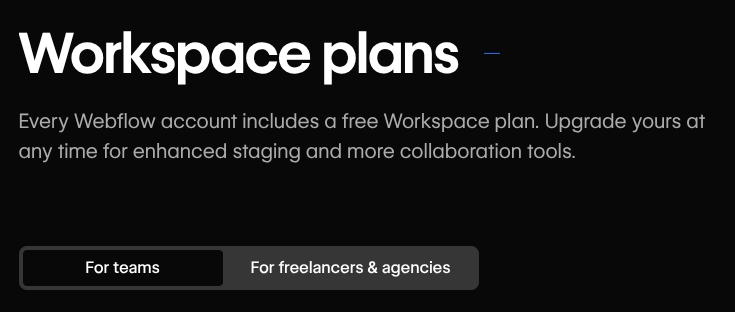
Webflow uses a dual-subscription system:
- Site plans control what a published Webflow website can do; hosting, domain, and CMS, among other features.
- Workspace plans manage a Webflow website’s staging sites, account-wide collaboration, and Webflow tools.
Webflow offers two Workspace tracks:
- The Starter plan, Core plan, and Growth plan for teams.
- The Starter, Freelancer, and Agency plans for freelancers and agencies.
If you run a team, you can use the Teams workspace track. But, if you are a freelancer or agency, you can use the freelancers & agencies Workspace track.
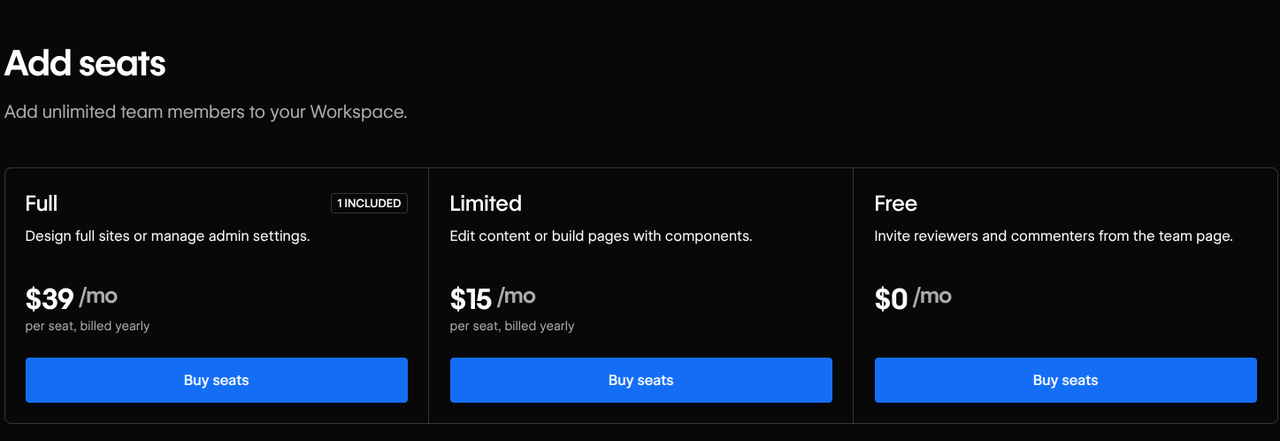
Going onto a Webflow Workspace plan will give you access to different seat arrangements. Here is the Webflow pricing associated with Workspace seats:
- Workspace owner seat: One Workspace owner seat is included with every Webflow Workspace. This seat is free and does not come with a price on top of your Webflow Workspace plan. There is only one seat, though, which can limit your website’s overall flexibility.
- Full access/designer seats: $39 per seat, every month, under the annual billing schedule and $45, per seat, every month, under the monthly billing schedule. This gives designers full control over the Webflow Designers and a Webflow website’s overall site settings.
- Limited seats: $15 per seat, every month, under the annual billing schedule and $19, per seat, every month, under the monthly billing schedule. These seats are limited, but can be used by content editors and other people that may require limited access to your Webflow website.
- Reviewer and commenter seats: free, with no charge. Users can review and comment on your website, without a paid seat. They cannot do much more than review and comment on your website, though, which means that their functionality is very limited.
- Client seats: These are bundled into the Freelancer and Agency Workspace plans. The Freelancer plan comes with one free client seat per Webflow website and the Agency plan comes with three free client seats per Webflow website.
Here are some of the features that sit behind Workspace plans rather than Site plans:
- Custom code: You can insert custom code into your Webflow website.
- Staging sites: You can host and test draft versions of your Webflow website.
- Code export: You can export raw HTML, CSS, JavaScript, and media assets into a “.zip” file.
To learn more about Webflow custom code, you can click here to view our Webflow custom code guide. And, you can click here to read our guide on Webflow client billing and how it relates to Webflow Workspace client seats.
Ecommerce plans: Standard, Plus and Advanced
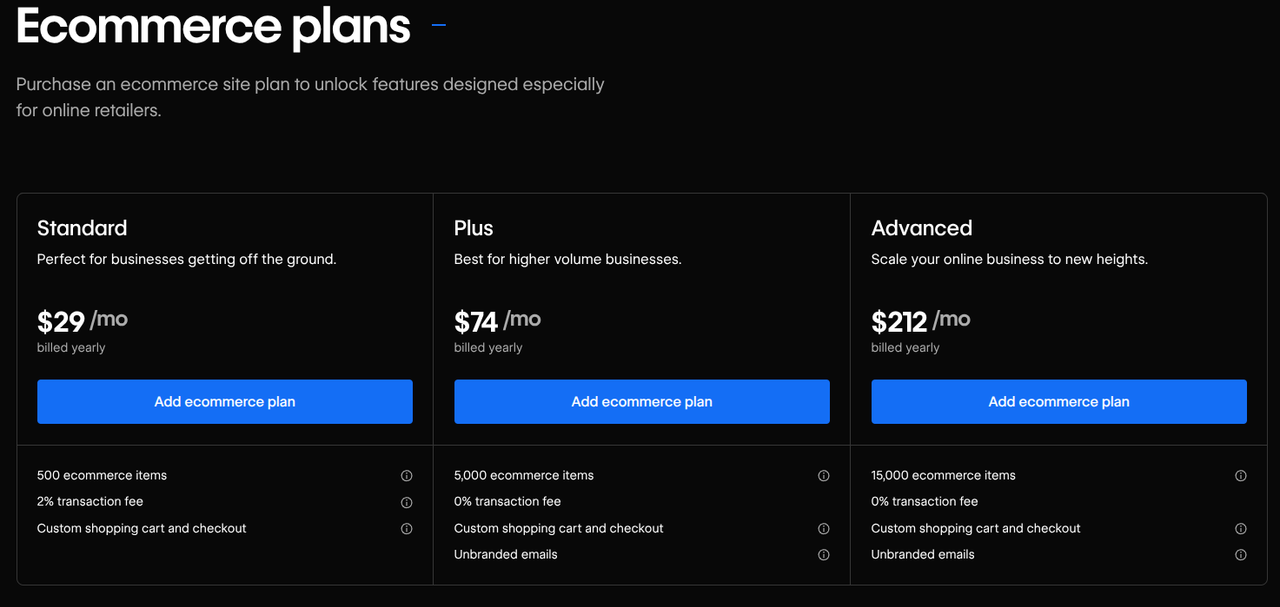
Webflow offers native Ecommerce site plans that, as per the May of 2026 Webflow pricing updates, are distinct from standard Webflow site plans. Here is a brief table with Webflow Ecommerce pricing information and the core features associated with Webflow’s Ecommerce site plans:
- Price (Billed Annually): Standard Plan: $29 Per Month; Plus Plan: $74 Per Month; Advanced Plan: $212 Per Month
- Ecommerce Item Limit: Standard Plan: 500 Items; Plus Plan: 5,000 Items; Advanced Plan: 15,000 Items
- Webflow Transaction Fee: Standard Plan: 2%; Plus Plan: 0%; Advanced Plan: 0%
- Included CMS Items: Standard Plan: 2,000 Items; Plus Plan: 10,000 Items; Advanced Plan: 10,000 Items
Webflow’s Ecommerce plans relate to CMS limits because Webflow’s Premium plan includes 20,000 CMS items while none of Webflow’s Ecommerce plans can include 20,000 CMS items. These Ecommerce plans rely on legacy limitations, which should be kept in mind. You can read Path To Flow’s Webflow Ecommerce review to learn more.
Platform plans: Team and Enterprise
Webflow comes with two major platform plans: the Team plan and the Enterprise plan. Both come with their own Webflow pricing.
The Webflow Team plan
The Webflow Team plan costs $2,500 per month and only offers an annual contract. This means that, in terms of Webflow pricing, you will be paying $30,000, upfront, for the year.
Here is some of what Webflow’s Team plan includes:
- Up to 100 CMS collections.
- 10 Workspace seats.
- Advanced governance and workflows, through publishing workflows, single-page publishing, site activity logs, security/compliance enhancements and page branching.
- 100,000 AI credits per year.
- Webflow Localize, which includes native multi-language localization features.
The Webflow Team plan is for mid-market B2B teams and fast-growing enterprises that do not require custom procurement agreements, yet have outgrown the limitations of previous Webflow plans.
The Webflow Enterprise plan
The Webflow Enterprise plan has no flat Webflow enterprise pricing and, instead, relies on a custom contract negotiated directly with Webflow’s sales team. You can read Path To Flow’s Webflow enterprise overview.
Here is some of what Webflow’s Enterprise plan includes:
- Dedicated hosting allocations
- Granular permissions and governance.
- Guaranteed performance through legally backed uptime SLAs.
- Dedicated support.
The Webflow Enterprise plan is for institutional brands, large corporations, and enterprise organizations working in heavily-regulated industries that require custom data-processing addendums and strict custom security reviews.
Add-ons: Optimize, Analyze, Localize and AI credits
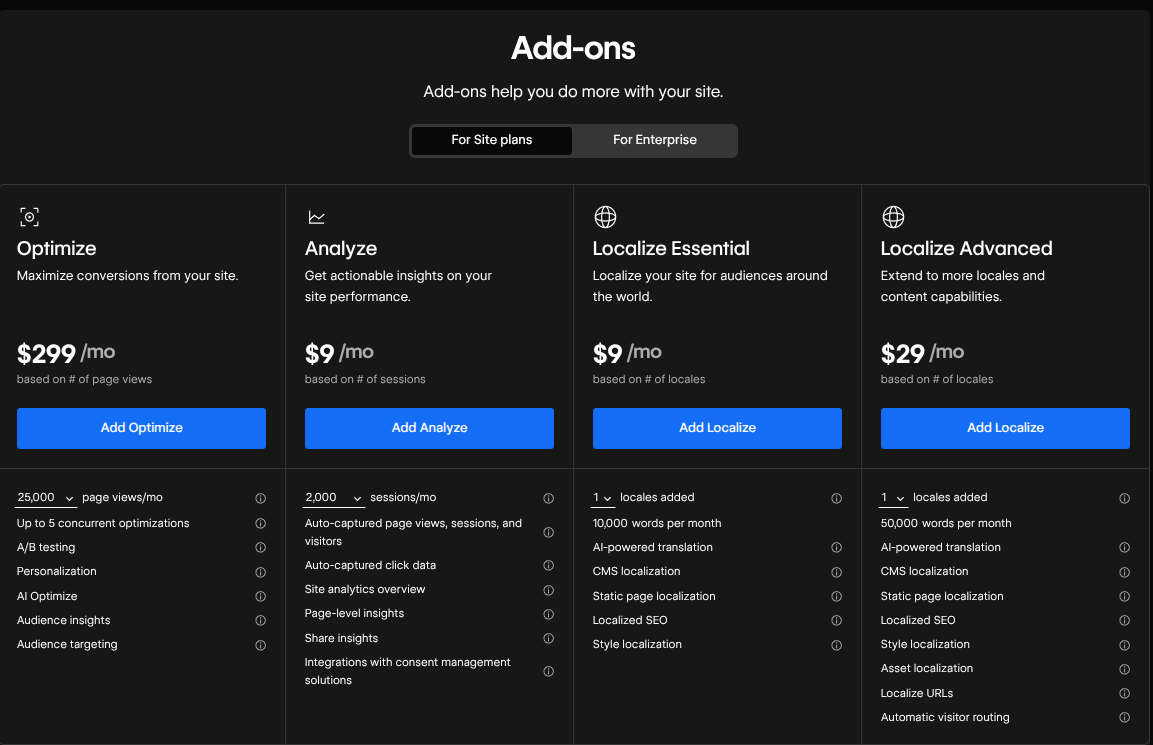
Webflow offers several add-ons for your Webflow website. Each one of these add-ons comes with its own unique set of features, a distinct metering system and a unique starting price.
- Webflow Optimize: What it does: Provides your B2B website with traditional A/B testing, audience personalization, multi-variable experiments, and AI traffic steering. How it is metered: Metered primarily through monthly page views or variations. Starting price: From $299 per month.
- Webflow Analyze: What it does: Serves as a native, built-in analytics tracker that places insights into your Webflow dashboard. Nocodelytics and Zuko Analytics are Webflow app alternatives. How it is metered: Metered by traffic volume, which starts at 2,000 sessions per month. Starting price: From $9 per month.
- Webflow Localize: What it does: Customizes and translates layouts, content, and assets natively for international markets. Lokalise is a Webflow app alternative. How it is metered: Metered per locale; up to 3 locales on “Essential” and up to 10 locales on “Advanced.” Starting price: From $9 per month, per locale on “Essential.” From $29 per month, per locale, on “Advanced.”
- AI Credits Pack: What it does: Refills the currency you need to generate CMS items, custom code, layout copy, and search optimizations. How it is metered: Metered flatly, per pack - each pack contains a set amount of credits and, when those credits are gone, a new pack is needed. Starting price: $20 per month, billed annually, for 2,000 AI credits.
Webflow offers a number of different AEO features and these features serve as Webflow’s core AI layer. Here is a table that highlights some of the AEO features associated with each Webflow plan:
- Basic & Premium: AEO features: Entry-level Webflow AI tools, including SEO and AEO optimization audits and suggestions. How it works: Using those AI features will consume a finite set of AI credits from your Webflow Workspace allotment.
- Workspace Plans: AEO features: A finite set of AI credits that can run a multitude of different AI features, including thorough AEO audits. How it works: Starter Workspaces get 200 credits per month. Core Workspaces get 300 credits per month. Growth Workspaces get 400 credits per month. If you run out, you will need to purchase the AI credits add-on pack.
- Team & Enterprise: AEO features: Advanced AEO agents are built directly into each tier. These AEO agents can perform a multitude of AEO tasks. How it works: Both the Team and Enterprise plans come with 100,000 AI credits per year. These credits reset annually.
What a Webflow site really costs: three scenarios
Scenario 01: A freelancer managing several client websites
Our first scenario is a freelance web designer managing a client-handover workflow with a Freelance workspace and two client-billed websites.
Here is the Webflow pricing breakdown for this scenario:
- The freelancer uses the Freelance workspace plan, which is $16 per month. Multiply $16 by 12 and you get an annual price of $192.
- The freelancer uses one Freelancer designer seat, which costs $39 per month. Multiply $39 by 12 and you get an annual price of $468.
- The freelancer relies on 2 Webflow Basic client staging instances that are passed to the client after launch. This Basic plan is $15 per month. Multiply $15 by 2, and then 12, and you get an annual price of $360.
The total cost, then, is as follows: $192 + $468 + $360 = $1,020 per year.
Scenario 02: A small e-commerce store
Our second scenario is a small e-commerce store that offers less than 500 products, relies on the Standard Webflow Ecommerce plan, and is managed solo using a basic Webflow workspace.
Here is the Webflow pricing breakdown for this scenario:
- The ecommerce store uses the Ecommerce site plan, which is $29 per month. Multiply $29 by 12 and you get an annual price of $348.
- The ecommerce store uses the Starter workspace plan, which is free.
- The ecommerce store relies on 2 Full Seats - 1 seat is free within the Starter workspace plan. This is $39 a month. Multiplied by 12, that is $468 per year.
- The ecommerce store receives $20,000 in annual store revenue. 2% of that is taken by Webflow Ecommerce fees. This is $400 a year in payment fees.
The total cost, then, is as follows: $348 + $0 + $468 + 400 = $1,216 per year.
Scenario 03: B2B SaaS marketing team with a small in-house team
Our third scenario is a content-rich marketing website, for a marketing team that uses CMS for their blog posts/case studies, with one full-time designer/marketer and one full-time content editor.
Here is the Webflow pricing breakdown for this scenario:
- The marketing team uses the Webflow Premium site plan, which is $25 per month. Multiplied by 12, this is $300 per year.
- The marketing team uses the Core workspace plan, which is $19 per month. Multiplied by 12, this is $228 per year.
- The marketing team uses two seats: one Full Seat and one Limited Seat. The Full Seat is free with the Core workspace plan. The Limited Seat is $15 per month, which is $180 per year.
The total cost, then, is as follows: $300 + $228 + $180 = $708 per year.
How to choose the right Webflow plan
You can choose the right Webflow plan by asking five questions:
- Do you need dynamic content, such as a blog, case studies, and/or team directory?
- How many internal web designers need layout editing capabilities simultaneously?
- Does your website need to render natively across multiple regional domains or global languages?
- Are customers purchasing your products directly, through an on-site checkout loop?
- Do you mandate custom publishing workflows, audit logs, data residency compliance, and/or SSO?
Every single one of these questions encompasses the wide variety of purposes your Webflow website may serve. To understand which Webflow plan is right for you, here are a series of answers to these questions:
Answers to Question 01 and what they mean
For the first question, if the answer is “No,” go with the “Basic” site plan.
But, if the answer is “Yes,” go with the “Premium” site plan.
Or, if you have a mass database, with lots of content, and/or strong security needs, go with the “Team” or “Enterprise” Webflow site plans.
Answers to Question 02 and what they mean
For the second question, if just 1 designer needs editing capabilities, go with the free Workspace tier paired with the “Premium” site plan.
On the other hand, if 2 to 9 designers need simultaneous editing capabilities, go with the “Core” or “Growth” workspace to purchase paid seats.
If 10+ designers need simultaneous editing capabilities, go with the “Team Platform” plan.
Answers to Question 03 and what they mean
For the third question, if your website is targeting a single market/language, use the “Basic” or “Premium” site plans.
However, if you are targeting 1 to 3 languages, use the “Premium” plan and add the “Localize Essential” add-on, which starts at $9 per month.
For complex global routing, use the “Team” or “Enterprise” site plans.
Answers to Question 04 and what they mean
For the fourth question, if the answer is “No,” and you use standard B2B lead generation forms, use the Webflow “Premium” site plan.
If the answer is “Yes,” and you receive under $2,250 a month in sales, use the “Ecommerce Standard” plan.
But, if the answer is “Yes,” and you receive over $2,250 a month in sales, use the “Ecommerce Plus” plan.
Answers to Question 05 and what they mean
If the answer is “No,” and you rely on simple reviews/staging, you can use the “Premium” or “Growth” workspaces. On the other hand, if you need some security features, such as page branching, use the “Team” plan.
Or, alternatively, if your website requires strict security protocols, use the “Enterprise” plan.
Path To Flow’s agency directory
If you need help scoping a Webflow build, you can visit Path To Flow’s website agency directory. If you want B2B website inspiration, you can read our B2B website design roundup.

