

What Webflow Enterprise is
Webflow Enterprise is a custom-contract Webflow plan for large organizations that require strict security, capacities tailored to their exact needs, and dedicated support that sits on top of Webflow’s platform.
Buyers have access to several Webflow plans: Webflow Basic, Webflow Premium, Webflow Team, and Webflow Enterprise. Unlike the three other plans, Webflow Enterprise requires a custom contract. Online stores run on separate Webflow Ecommerce plans.
Up until May of 2026, Webflow offered a “Webflow Business” plan which was often compared to “Webflow Enterprise.” Webflow Business is no longer available and the comparison no longer applies.
Webflow Enterprise vs Team vs Premium
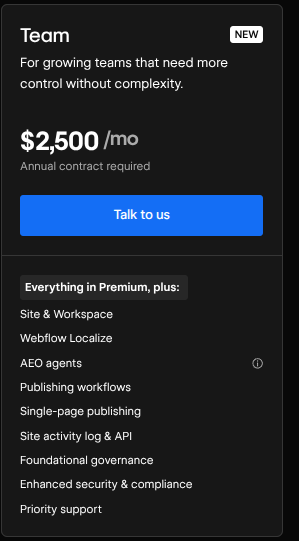
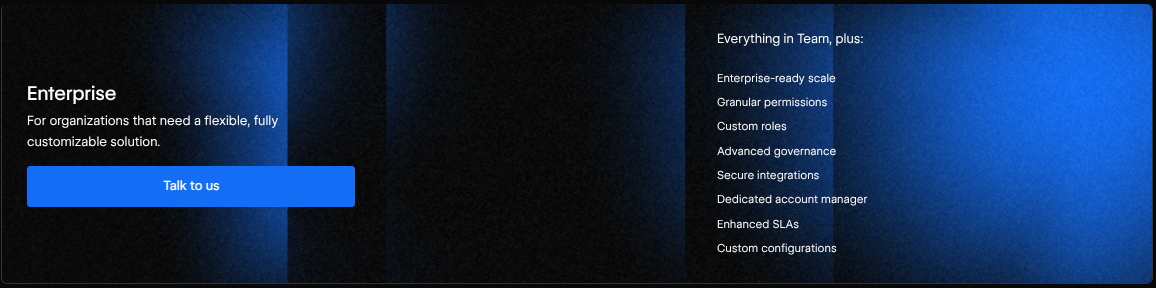
The table below shows what Webflow Enterprise offers when compared with Webflow Team and Webflow Premium. You can click here to read Webflow’s “Pricing” page and learn more about these Webflow features.
- Seats: Webflow Premium: Zero seats are included. You must purchase standalone Webflow Workspace seats. Webflow Team: 10 seats are included. 5 of these seats are Full Design seats and 5 of these seats are Limited Content seats. Webflow Enterprise: Custom pooled seats tailored to your Webflow needs.
- CMS and collections: Webflow Premium: 40 CMS collections and 20,000 CMS items. Webflow Team: 100 CMS collections and 20,000 CMS items. Webflow Enterprise: Custom CMS collection and CMS item limits, tailored to your Webflow needs.
- Bandwidth: Webflow Premium: 50GB to 2.5TB of monthly bandwidth, depending on your configuration. Webflow Team: Up to 30TB a year. Webflow Enterprise: Custom bandwidth pooled across the Webflow websites that sit on your Webflow Enterprise plan.
- Localization: Webflow Premium: A standalone paid add-on per Webflow website. Webflow Team: 2 locales included natively. Webflow Enterprise: A custom number of locales that will be spread across multi-site networks.
- Governance: Webflow Premium: A basic site activity log and basic roles. Webflow Team: A site activity log, page branching, approval workflows, and 5-times API limits for up to 600 requests in 60 seconds. Webflow Enterprise: SSO (SAML), SCIM provisioning, page-level permissions, custom roles, audit logs, and SOC 2 Type II; as well as the governance features offered by other plans.
- Uptime SLA: Webflow Premium: None. Webflow Team: 99.00% uptime SLA. Webflow Enterprise: 99.99% uptime SLA with a contractual guarantee.
- Support/contract terms: Webflow Premium: Email support; Webflow aims for a 48-hour response time. Webflow Team: 24/7 priority support and 12-hour response time for major incidents. Webflow Enterprise: 24/7 priority support, a 1-hour response time for major incidents, as well as a dedicated Account Manager.
Jumping from Webflow Premium to Webflow Team turns Webflow into an operational platform that can handle just about any business website need. Jumping from Webflow Team to Webflow Enterprise gives you more of the same features and allows your website to satisfy strict IT governance/security requirements.
Governance and security
Webflow Enterprise offers the following governance and security features:
- SSO: SSO lets employees log into Webflow using their company credentials, such as Google Workspace identification, as opposed to being forced to make a Webflow account. IT and security teams will ask for SSO, as SSO allows IT/security teams to enforce security rules across every tool the company uses.
- SCIM provisioning: Systems for Cross-Domain Management “SCIM” - automatically creates, updates, and revokes Webflow account access when an employee changes roles, is hired, or leaves the company. IT asks for SCIM provisioning, so that they don’t have to manually remove employees from company accounts.
- Custom roles and granular permissions: Custom roles and granular permissions are used to restrict what certain team members can access so that, for example, a content writer cannot mess with their company’s Webflow website’s visual design. Security teams ask for custom roles and granular permissions so that the company website can stay secure while certain roles work on specific pages/elements.
- Audit logs: Audit logs are time-stamped digital ledgers that record every major action within a Webflow Workspace. Such as who logged in, changed permissions, or modified a page; among others. Information security teams ask for audit logs because they use them to solve breaches, and other security issues.
- Compliance documentation: Compliance documentation are official, third-party audited reports that legally verify Webflow’s security controls, data privacy safeguards, and encryption standards. Legal, risk, and compliance teams ask for compliance documentation, to ensure that industry regulations will be satisfied.
Publishing workflows, branching and staging
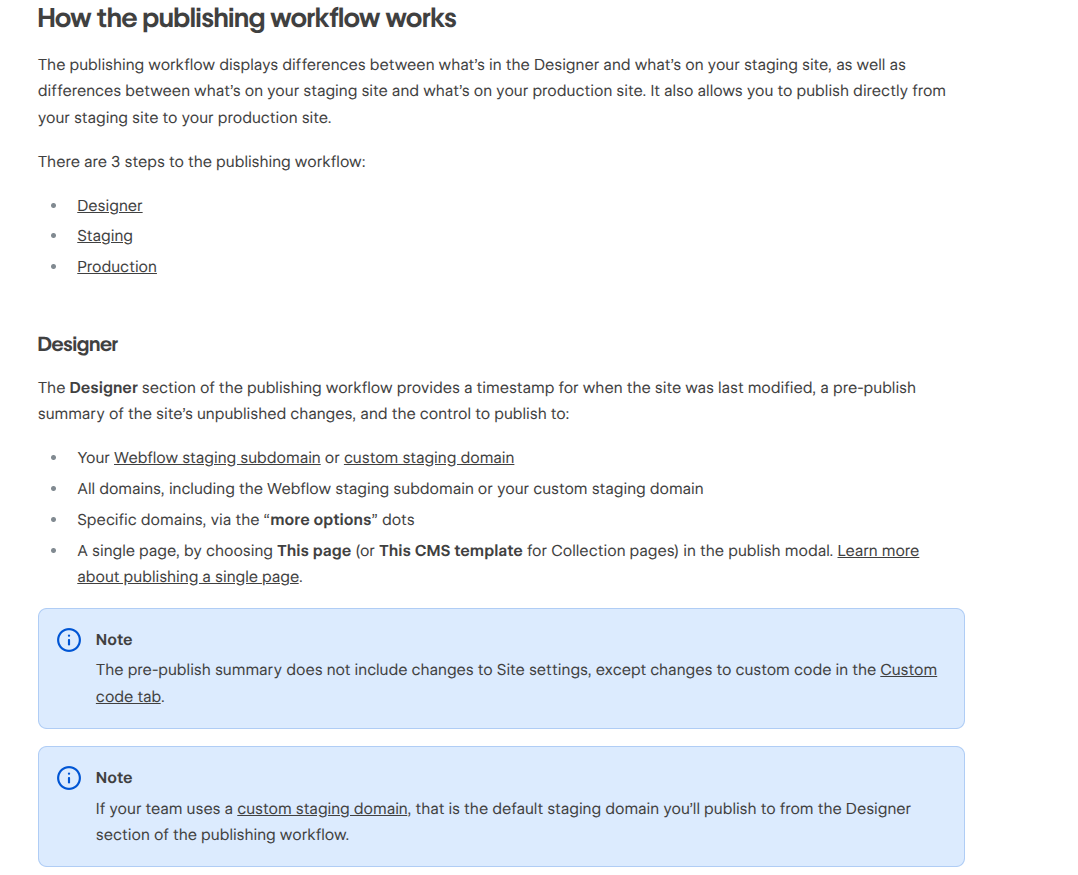
Webflow Enterprise teams need to review and approve changes before they go live. Here is how they can do that with Webflow Enterprise:
- Isolated page branching: Instead of editing the live page directly, designers and developers can create an isolated page branch that serves as a copy of the page they want to adjust. This prevents accidental edits.
- Dedicated branch staging: Designers and developers can take an isolated branch and put it within its own staging URL. Stakeholders can test the page and leave comments with Webflow’s commenting tool.
- Custom role review gates: A designer/developer can submit their branch for review. Designated approvers will be notified to inspect the changes but merging the branch with the main page will be restricted until an authorized reviewer approves those changes.
- 2-stage production publishing: Right after a page branch is merged into the main site, Webflow Enterprise will publish to staging for final QA, generate a summary of the edits tied to the people who made them, and publish to production/the main site after an authorized team member approves the changes.
Some of the major differences, between this Webflow Enterprise workflow and the workflow offered by other Webflow tiers, are as follows:
- Webflow’s lower pricing tiers force everyone to work on the shared, live site. They do not offer isolated page branching and unfinished work can block every other team member from publishing.
- Webflow’s standard plans only offer one global staging environment for the entire website. Dedicated branch staging is not available.
- Webflow’s “Team” and “Premium” plans allow anyone with edit access to overwrite main page copy and design elements, among many others, even if those changes have not been approved by a higher-up.
- Webflow Enterprise comes with a unique 2-stage production publishing pipeline that the other Webflow pricing tiers do not offer.
Hosting, SLAs and scale
Unlike the other Webflow plans, Webflow Enterprise allows for custom infrastructure baselines that, when implemented within your Webflow Enterprise plan, will be backed by legally-binding reliability agreements.
The following is what you need to know about Webflow Enterprise’s infrastructure:
- Uptime SLAs: Webflow Enterprise comes with a guaranteed 99.99% uptime SLA that caps allowable downtime at no more than 52.6 minutes a year/4.3 minutes a month. In contrast, Webflow Team’s 99.00% uptime SLA caps downtime to 87.6 hours per year/ 7 hours of downtime each month.
- Incident response SLAs: Webflow Enterprise contracts come with a guaranteed 1-hour response time SLA for major outages and 24/7 dedicated incident support for any/all incidents your Webflow website may experience at a given time.
- Custom SSL and security headers: Webflow Enterprise lets organizations upload/manage custom third party SSL/TLS certificates. Plus, Webflow Enterprise also lets administrators configure custom HTTP security headers directly on the Webflow hosting infrastructure.
- DDoS protection: Webflow Enterprise comes with enterprise-grade DDoS protection that is powered by “AWS Shield Advanced.” This enterprise protection offers automatic traffic scrubbing and proactive threat detection, as well as protection against high-volume layer 3, 4, and 7 attacks during heavy traffic spikes.
- Custom limits for CMS items, pages, and traffic: Webflow Enterprise offers custom limits for CMS items, pages, and traffic, allowing for CMS items, pages, and traffic that greatly exceed the limits of lower Webflow pricing plans.
Support, onboarding and Enterprise partners
Webflow Enterprise comes with a unique support model that is aided by certified Webflow Enterprise Partner Agencies:
Here is the Webflow Enterprise direct support model:
- A dedicated customer success manager: Your Webflow Enterprise account will come with a dedicated customer success manager. Or, “CSM,” for short. Your CSM will work with developers, marketers, and designers to align Webflow with your business goals.
- A dedicated solutions architect: Your Webflow Enterprise account will come with a dedicated solutions architect. The dedicated solutions architect will help with architecture planning, custom integrations, pre-launch security, and tech stack integration; along with a wide variety of other technical challenges.
- Tailored onboarding: Your Webflow Enterprise account will come with tailored onboarding that takes the form of customized enablement paths. Using these customized enablement paths, while browsing the expansive Webflow University, will make onboarding much easier than it might normally be.
- 24/7 priority support: Your Webflow Enterprise account will come with 24/7 priority support that lets you bypass Webflow’s traditional support queues and speak to senior Webflow Enterprise engineers at nearly any time.
Every single one of the members listed above will support your Webflow Enterprise success. Beyond those members, and their roles, you can work with certified Webflow Enterprise Partner Agencies that know how to handle design, custom development, and execution. Here is how this usually works:
- Organizations that lack in-house visual development teams can work with certified Webflow Enterprise Partner Agencies to build their core Webflow design system and its assorted components.
- Webflow’s dedicated solutions architect can work with your chosen Partner Agency to review code, inspect the CMS, and approve your Webflow site architecture before it goes live.
- Webflow Enterprise Partner Agencies are vetted agencies that specialize in complex code migrations, large-scale web builds, and custom code builds.
If you want to find a Webflow Enterprise Partner Agency, you can click here to visit Path To Flow’s agency directory. Filter for Enterprise partners by clicking “Filters” and, under “Specialties,” selecting “Enterprise.”
What Webflow Enterprise costs
If you are asking “how much does Webflow Enterprise cost,” here is the answer: Webflow Enterprise uses custom pricing and, unlike other Webflow pricing tiers, there is no uniform price for a Webflow Enterprise plan.
The total annual cost, for a Webflow Enterprise plan, is dependent on factors like your organization's technical footprint and overall support profile, among various others.
Here are the key drivers of a Webflow Enterprise pricing quote:
- User seats and roles: The number of user seats your Webflow Workspace requires, and the roles for each of these seats, will greatly affect your Webflow Enterprise pricing quote.
- Data scale: Going beyond standard Webflow limits by expanding CMS item, static page, and collection limits, will drive up your Webflow Enterprise pricing quote.
- Contract length: Multi-year Master Service Agreements will, more often than not, come with lower annual costs than one-year Webflow Enterprise commitment.
- Traffic volume and bandwidth pooling: The total expected monthly traffic, and the bandwidth this traffic will require for data transfer across all sites, will greatly affect your Webflow Enterprise pricing quote.
- Site count: The number of sites you will be hosting, and the overall size of your site network, can drive up your Webflow Enterprise pricing quote.
- Add-ons: You can apply add-ons to the sites under your Webflow Enterprise plan. These add-ons often come with their own monthly costs, which can drive up your Webflow Enterprise pricing quote.
You can find three third-party Webflow Enterprise price estimates, from named sources, in the space below:
- Entry-level Webflow Enterprise agreements: $15,000 per year, according to Brix Templates. This entry-level Webflow Enterprise agreement encompasses priority support, custom security headers, and extra bandwidth. But, this plan typically lacks certain governance features, like page branching.
- Webflow Enterprise agreements for multiple low-traffic sites: $65,000 per year, according to this Reddit post by Reddit user “u/YourMarketSpectator.”
- Full-level Webflow Enterprise agreements with all of the Enterprise tier’s key features: $50,000 per year is the starting point, according to another estimate created by Brix Templates. This Webflow Enterprise tier includes branching, permissions, and broader governance; among other features.
Each one of the above is an estimate from different Webflow Enterprise reviews and should not be considered a verified plan.
Who actually needs Enterprise (and when Team or Premium is enough)
You may need Webflow Enterprise. But, alternatively, Webflow Team or Webflow Premium may be more than sufficient. You can use the decision framework found below to figure out which Webflow plan is right for you.
If any one of the following is true for your website, Webflow Enterprise is the right Webflow plan:
- Your website requires SSO and/or SCIM provisioning.
- Your website requires granular role controls.
- Your website requires page locking.
- Your website requires 99.99% uptime.
- Your website requires 1-hour incident SLAs.
- Your website requires multi-site account pooling.
- Your website requires more than 500 static pages.
- Your website requires custom elevated API request limits above 600 RPM.
- Your website receives over 30TB of annual traffic, or custom elevated API request limits above 600 RPM.
If none of the above are true for your website, but one of the items seen below is true, Webflow Team is the right Webflow plan:
- You have no more than 10 team members that need dedicated access to the Webflow site.
- You require staging URLs, isolated page branching, and approval gates.
- You operate in up to two different languages.
- You think that a 99.00% uptime SLA is more than sufficient for your website.
Finally, if the above are not true, but at least one of the following is true, then Webflow Premium should be enough:
- You only have one-to-three active collaborators working on the site.
- Your site requires no more than 20,000 CMS items, 40 collections, and up to 300 static pages.
- You can pay for specific features/apps when needed; such as Webflow Localize for multi-language support.
- Your finance team is comfortable paying on a monthly/annual credit card billing cycle.

